
Technology
How a Modern Website Protects User Data: Security Layers Explained
Updated:
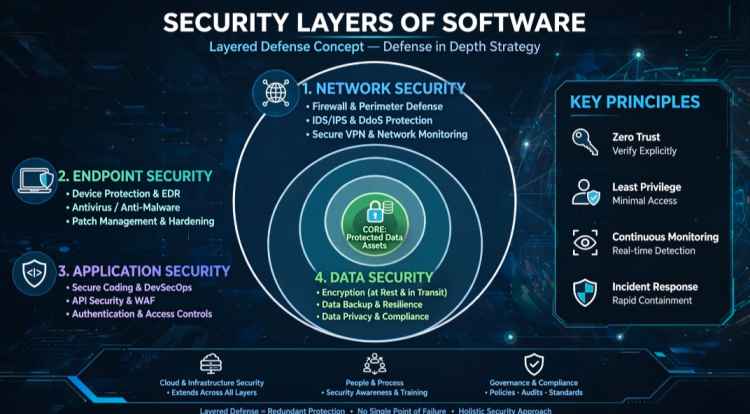
Key Highlights
- 𝑯𝑻𝑻𝑷𝑺 & 𝑻𝑳𝑺 𝒆𝒏𝒄𝒓𝒚𝒑𝒕𝒊𝒐𝒏 protects data while it travels between the user's browser and the website.
- 𝑨𝒖𝒕𝒉𝒆𝒏𝒕𝒊𝒄𝒂𝒕𝒊𝒐𝒏 𝒂𝒏𝒅 𝒑𝒂𝒔𝒔𝒘𝒐𝒓𝒅 hashing help prevent unauthorized access to user accounts.
- 𝑺𝒆𝒔𝒔𝒊𝒐𝒏 𝒂𝒏𝒅 𝒄𝒐𝒐𝒌𝒊𝒆 𝒔𝒆𝒄𝒖𝒓𝒊𝒕𝒚 protects users after they log in.
- 𝑨𝒖𝒕𝒉𝒐𝒓𝒊𝒛𝒂𝒕𝒊𝒐𝒏 𝒂𝒏𝒅 𝑹𝑩𝑨𝑪 ensure users can access only the features and data they are permitted to use.
- 𝑰𝒏𝒑𝒖𝒕 𝒗𝒂𝒍𝒊𝒅𝒂𝒕𝒊𝒐𝒏 helps defend against malicious or unexpected user input.
- 𝑺𝑸𝑳 𝒊𝒏𝒋𝒆𝒄𝒕𝒊𝒐𝒏 𝒂𝒏𝒅 𝑿𝑺𝑺 𝒑𝒓𝒐𝒕𝒆𝒄𝒕𝒊𝒐𝒏 helps protect applications and databases from common web attacks.
- 𝑪𝑺𝑹𝑭 𝒑𝒓𝒐𝒕𝒆𝒄𝒕𝒊𝒐𝒏 helps prevent unauthorized actions performed through a user's authenticated session.
- 𝑺𝒆𝒄𝒖𝒓𝒆 𝒇𝒊𝒍𝒆 𝒖𝒑𝒍𝒐𝒂𝒅𝒔 reduce the risk of malicious files entering a website.
- 𝑾𝑨𝑭𝒔, 𝒇𝒊𝒓𝒆𝒘𝒂𝒍𝒍𝒔 𝒂𝒏𝒅 𝒓𝒂𝒕𝒆 𝒍𝒊𝒎𝒊𝒕𝒊𝒏𝒈 help detect, block or restrict suspicious traffic.
- 𝑫𝒂𝒕𝒂𝒃𝒂𝒔𝒆 𝒔𝒆𝒄𝒖𝒓𝒊𝒕𝒚 𝒂𝒏𝒅 𝒆𝒏𝒄𝒓𝒚𝒑𝒕𝒊𝒐𝒏 help protect sensitive information stored on servers.
- 𝑺𝒆𝒄𝒖𝒓𝒊𝒕𝒚 𝒉𝒆𝒂𝒅𝒆𝒓𝒔 provide browsers with additional instructions to reduce certain security risks.
- 𝑳𝒐𝒈𝒈𝒊𝒏𝒈 𝒂𝒏𝒅 𝒎𝒐𝒏𝒊𝒕𝒐𝒓𝒊𝒏𝒈 help detect suspicious activity and investigate security incidents.
- 𝑹𝒆𝒈𝒖𝒍𝒂𝒓 𝒖𝒑𝒅𝒂𝒕𝒆𝒔 𝒂𝒏𝒅 𝒗𝒖𝒍𝒏𝒆𝒓𝒂𝒃𝒊𝒍𝒊𝒕𝒚 management help address security weaknesses in software and dependencies.
- 𝑩𝒂𝒄𝒌𝒖𝒑𝒔 𝒂𝒏𝒅 𝒅𝒊𝒔𝒂𝒔𝒕𝒆𝒓 𝒓𝒆𝒄𝒐𝒗𝒆𝒓𝒚 help websites restore important data after failures or security incidents.
- 𝑫𝒆𝒇𝒆𝒏𝒔𝒆 𝒊𝒏 𝒅𝒆𝒑𝒕𝒉 𝒄𝒐𝒎𝒃𝒊𝒏𝒆𝒔 𝒎𝒖𝒍𝒕𝒊𝒑𝒍𝒆 𝒔𝒆𝒄𝒖𝒓𝒊𝒕𝒚 layers so that one failed control does not leave the entire system exposed.
𝐇𝐨𝐰 𝐚 𝐌𝐨𝐝𝐞𝐫𝐧 𝐖𝐞𝐛𝐬𝐢𝐭𝐞 𝐏𝐫𝐨𝐭𝐞𝐜𝐭𝐬 𝐔𝐬𝐞𝐫 𝐃𝐚𝐭𝐚: 𝐒𝐞𝐜𝐮𝐫𝐢𝐭𝐲 𝐋𝐚𝐲𝐞𝐫𝐬 𝐄𝐱𝐩𝐥𝐚𝐢𝐧𝐞𝐝
Every time you visit a website, log in to an account, upload a file, make a payment, or submit personal information, multiple security mechanisms may be working behind the scenes to protect your data.
Website security is not a single feature. A secure website uses several layers that work together to protect information while it travels between your device and the server, while it is processed by the application, and while it is stored in databases and other systems.
But what exactly are these security layers, and how do they work?
From HTTPS and authentication to firewalls, database protection, security headers, monitoring and backups, this guide explains the major technologies used to protect modern websites and the data they handle.
𝟏. 𝐇𝐓𝐓𝐏𝐒 𝐚𝐧𝐝 𝐓𝐋𝐒 𝐄𝐧𝐜𝐫𝐲𝐩𝐭𝐢𝐨𝐧:
The first security layer most users encounter is HTTPS.
HTTPS stands for Hypertext Transfer Protocol Secure. It uses Transport Layer Security (TLS) to encrypt communication between a browser and a website.
Without encryption, information sent over a network could potentially be intercepted. This is particularly important when users submit passwords, payment information, personal details or other sensitive data.
When a website uses HTTPS, the browser establishes a secure TLS connection with the server. Information transmitted through that connection is encrypted, making it significantly harder for an attacker monitoring the network to read or modify the communication.
Users can generally identify an HTTPS connection by the padlock indicator in their browser's address bar, although the presence of HTTPS alone does not prove that a website is trustworthy.
𝟐. 𝐃𝐍𝐒 𝐚𝐧𝐝 𝐃𝐨𝐦𝐚𝐢𝐧 𝐒𝐞𝐜𝐮𝐫𝐢𝐭𝐲:
Before a browser can connect to a website, it needs to find the server hosting that website. This is handled through the Domain Name System, commonly known as DNS.
DNS security is important because attackers may attempt to redirect users to malicious destinations or interfere with domain resolution.
Organizations can use measures such as DNSSEC, secure domain registrar accounts, strong authentication and appropriate DNS configuration to reduce these risks.
Protecting the domain itself is also important. If an attacker gains control of a domain account, they may be able to redirect visitors or interfere with email and website services.
𝟑. 𝐂𝐃𝐍 𝐚𝐧𝐝 𝐖𝐞𝐛 𝐀𝐩𝐩𝐥𝐢𝐜𝐚𝐭𝐢𝐨𝐧 𝐅𝐢𝐫𝐞𝐰𝐚𝐥𝐥:
Many modern websites use a Content Delivery Network, or CDN, to deliver content efficiently to users around the world.
A CDN can also provide an additional security layer.
Some CDN providers offer a Web Application Firewall (WAF), which examines incoming requests and can block traffic matching known malicious patterns.
For example, a WAF may help identify suspicious requests associated with common attacks, including attempts to exploit vulnerable application endpoints.
A WAF is not a replacement for secure application development. Instead, it provides another defensive layer between potentially malicious traffic and the application server.
𝟒. 𝐖𝐞𝐛 𝐒𝐞𝐫𝐯𝐞𝐫 𝐒𝐞𝐜𝐮𝐫𝐢𝐭𝐲:
The web server sits between incoming requests and the application in many website architectures.
Servers such as Nginx or Apache can be configured to improve security by controlling which requests are accepted, limiting access to sensitive paths, serving HTTPS traffic and adding security-related HTTP headers.
A properly configured server should expose only the services that are actually required.
Administrators should also avoid revealing unnecessary server information and should regularly update server software to address known vulnerabilities.
𝟓. 𝐀𝐮𝐭𝐡𝐞𝐧𝐭𝐢𝐜𝐚𝐭𝐢𝐨𝐧:
Authentication answers one important question:
𝐖𝐡𝐨 𝐚𝐫𝐞 𝐲𝐨𝐮?
When a user logs into a website, the application needs to verify their identity.
A common authentication process involves a username or email address and a password. More secure systems can also use additional authentication factors, such as an authenticator application, hardware security key or other verification method.
Authentication systems should be designed to prevent attackers from repeatedly guessing credentials.
Rate limiting, account lockout strategies where appropriate, suspicious-login detection and multi-factor authentication can help reduce the risk of account compromise.
𝟔. 𝐏𝐚𝐬𝐬𝐰𝐨𝐫𝐝 𝐇𝐚𝐬𝐡𝐢𝐧𝐠:
Websites should not normally store user passwords as readable text.
Instead, passwords should be processed using a secure password-hashing algorithm before being stored.
Modern password-hashing approaches are designed to make it computationally expensive for attackers to recover the original password from a stolen password database.
A secure password system also uses unique salts and appropriate work factors.
This means that even if an attacker obtains a database containing password hashes, recovering the original passwords is substantially more difficult than if passwords had been stored in plain text or using an inappropriate hashing method.
𝟕. 𝐒𝐞𝐬𝐬𝐢𝐨𝐧 𝐚𝐧𝐝 𝐂𝐨𝐨𝐤𝐢𝐞 𝐒𝐞𝐜𝐮𝐫𝐢𝐭𝐲:
After a user successfully logs in, websites usually need a way to remember that authentication during subsequent requests.
This is commonly handled through sessions or authentication tokens.
Session security is therefore extremely important.
Cookies containing authentication information should use appropriate security attributes such as:
𝐈.𝐒𝐞𝐜𝐮𝐫𝐞 : helps ensure cookies are sent only over HTTPS.
𝐈𝐈.𝐇𝐭𝐭𝐩𝐎𝐧𝐥𝐲 : prevents JavaScript from directly accessing the cookie.
𝐈𝐈𝐈.𝐒𝐚𝐦𝐞𝐒𝐢𝐭𝐞 : helps reduce certain cross-site request risks.
Applications should also expire sessions appropriately and invalidate sessions when necessary, such as after logout or sensitive account changes.
𝟖. 𝐀𝐮𝐭𝐡𝐨𝐫𝐢𝐳𝐚𝐭𝐢𝐨𝐧 𝐚𝐧𝐝 𝐑𝐨𝐥𝐞-𝐁𝐚𝐬𝐞𝐝 𝐀𝐜𝐜𝐞𝐬𝐬 𝐂𝐨𝐧𝐭𝐫𝐨𝐥:
Authentication determines who a user is. Authorization determines what that user is allowed to do.
Consider a news website with different users:
1.Administrator
2.Editor
3.Author
4.Registered user
5.Visitor
An administrator may be allowed to create or delete users, while an author may only be allowed to create or edit their own articles.
This concept is known as Role-Based Access Control, or RBAC.
A secure application should check permissions on the server, not simply hide buttons in the user interface.
𝟗. 𝐈𝐧𝐩𝐮𝐭 𝐕𝐚𝐥𝐢𝐝𝐚𝐭𝐢𝐨𝐧:
Web applications constantly receive information from users.
Examples include:
1.Login forms
2.Search boxes
3.Comment forms
4.Contact forms
5.Profile information
6.File uploads
7.API requests
Every input should be treated as untrusted until it has been properly validated.
Validation can check whether data has the expected type, length, format and range.
For example, if an application expects an email address, it should validate that the submitted value follows an acceptable email format.
Input validation reduces the possibility of unexpected data reaching sensitive parts of the application.
𝟏𝟎. 𝐏𝐫𝐨𝐭𝐞𝐜𝐭𝐢𝐨𝐧 𝐀𝐠𝐚𝐢𝐧𝐬𝐭 𝐒𝐐𝐋 𝐈𝐧𝐣𝐞𝐜𝐭𝐢𝐨𝐧:
Applications frequently communicate with databases.
If user input is inserted into database queries incorrectly, attackers may attempt SQL injection attacks.
For example, an application that constructs SQL statements directly from untrusted input can potentially allow an attacker to manipulate the intended query.
Modern applications should use parameterized queries, prepared statements or trusted ORM mechanisms rather than constructing SQL commands through unsafe string concatenation.
Database accounts should also have only the permissions they actually need.
𝟏𝟏. 𝐏𝐫𝐨𝐭𝐞𝐜𝐭𝐢𝐨𝐧 𝐀𝐠𝐚𝐢𝐧𝐬𝐭 𝐂𝐫𝐨𝐬𝐬-𝐒𝐢𝐭𝐞 𝐒𝐜𝐫𝐢𝐩𝐭𝐢𝐧𝐠:
Cross-Site Scripting, commonly called XSS, occurs when an attacker is able to cause malicious script content to execute in another user's browser.
This can happen when applications improperly handle user-controlled content.
Defenses include appropriate output encoding, input handling, secure templating systems and Content Security Policy where suitable.
Developers should be particularly careful with user-generated content such as comments, profile information and article submissions.
𝟏𝟐. 𝐂𝐒𝐑𝐅 𝐏𝐫𝐨𝐭𝐞𝐜𝐭𝐢𝐨𝐧:
Cross-Site Request Forgery, or CSRF, involves tricking an authenticated user's browser into sending an unwanted request to a website.
For example, an attacker may attempt to cause a logged-in user to unknowingly submit a request that changes an account setting.
Frameworks such as Django provide built-in CSRF protection mechanisms.
Applications should correctly implement these protections rather than disabling them simply to make a particular request work.
𝟏𝟑. 𝐒𝐞𝐜𝐮𝐫𝐞 𝐅𝐢𝐥𝐞 𝐔𝐩𝐥𝐨𝐚𝐝𝐬:
File uploads can introduce additional security risks.
A website may allow users or administrators to upload images, documents or other media. If uploads are not properly controlled, attackers may attempt to upload malicious files.
A secure upload system can include:
1.File-type validation
2.File-size limits
3.Safe file naming
4.Content-type validation
5.Storage outside executable directories
6.Permission restrictions
7.Malware scanning where appropriate
The application should never assume that a file is safe simply because its filename ends with an expected extension.
𝟏𝟒. 𝐀𝐏𝐈 𝐒𝐞𝐜𝐮𝐫𝐢𝐭𝐲:
Modern websites increasingly rely on APIs.
A frontend application may communicate with a backend API to retrieve user profiles, products, articles, orders or other information.
APIs need the same security principles as traditional web pages.
They should use authentication and authorization where required, validate incoming data, limit request rates and avoid exposing unnecessary information.
API endpoints should also return appropriate errors without revealing sensitive internal details such as database queries, server paths or secret configuration information.
𝟏𝟓. 𝐃𝐚𝐭𝐚𝐛𝐚𝐬𝐞 𝐒𝐞𝐜𝐮𝐫𝐢𝐭𝐲:
The database is often one of the most valuable components of a web application because it may contain user accounts, orders, content and other sensitive information.
Database security begins with access control.
The application should connect using a database account with only the permissions it needs. Direct public access to the database should generally be avoided.
Database credentials should also be kept outside publicly accessible source code and managed through secure configuration or secret-management systems.
Sensitive information may require additional encryption or protection depending on its nature and the application's requirements.
𝟏𝟔. 𝐒𝐞𝐜𝐮𝐫𝐢𝐭𝐲 𝐇𝐞𝐚𝐝𝐞𝐫𝐬:
HTTP security headers allow websites to communicate security-related instructions to browsers.
Common examples include:
𝗜.𝗖𝗼𝗻𝘁𝗲𝗻𝘁-𝗦𝗲𝗰𝘂𝗿𝗶𝘁𝘆-𝗣𝗼𝗹𝗶𝗰𝘆 (𝗖𝗦𝗣)
𝗜𝗜.𝗦𝘁𝗿𝗶𝗰𝘁-𝗧𝗿𝗮𝗻𝘀𝗽𝗼𝗿𝘁-𝗦𝗲𝗰𝘂𝗿𝗶𝘁𝘆 (𝗛𝗦𝗧𝗦)
𝗜𝗜𝗜.𝗫-𝗖𝗼𝗻𝘁𝗲𝗻𝘁-𝗧𝘆𝗽𝗲-𝗢𝗽𝘁𝗶𝗼𝗻𝘀
𝗜𝗩.𝗫-𝗙𝗿𝗮𝗺𝗲-𝗢𝗽𝘁𝗶𝗼𝗻𝘀
𝗩.𝗥𝗲𝗳𝗲𝗿𝗿𝗲𝗿-𝗣𝗼𝗹𝗶𝗰𝘆
These headers can help reduce certain browser-based attacks and prevent unintended browser behavior.
For example, CSP can restrict which scripts and other resources a browser is allowed to load, reducing the impact of some types of XSS attacks.
𝟏𝟕. 𝐑𝐚𝐭𝐞 𝐋𝐢𝐦𝐢𝐭𝐢𝐧𝐠:
Not every attack involves sophisticated malware.
Sometimes attackers simply send a large number of requests.
Rate limiting restricts how frequently a client can perform certain actions within a particular period.
For example, a login endpoint might limit repeated authentication attempts.
Rate limiting can help reduce password-guessing attempts, abusive API usage and certain automated attacks.
The limits should be designed carefully so legitimate users are not unnecessarily blocked.
𝟏𝟖. 𝐅𝐢𝐫𝐞𝐰𝐚𝐥𝐥 𝐚𝐧𝐝 𝐍𝐞𝐭𝐰𝐨𝐫𝐤 𝐒𝐞𝐜𝐮𝐫𝐢𝐭𝐲:
Firewalls provide another layer of protection by controlling network traffic.
A server firewall can restrict which ports and services are accessible from the internet.
For example, a production web server may need public access to ports used for HTTP and HTTPS, while administrative services such as SSH should be restricted as much as practical.
Cloud environments can also use security groups or network access controls to control inbound and outbound traffic.
The principle is simple:
𝐄𝐱𝐩𝐨𝐬𝐞 𝐨𝐧𝐥𝐲 𝐰𝐡𝐚𝐭 𝐢𝐬 𝐧𝐞𝐜𝐞𝐬𝐬𝐚𝐫𝐲.
𝟏𝟗. 𝐋𝐨𝐠𝐠𝐢𝐧𝐠 𝐚𝐧𝐝 𝐌𝐨𝐧𝐢𝐭𝐨𝐫𝐢𝐧𝐠:
Security does not end when an application is deployed.
Websites should be monitored for unusual activity.
Logs can record events such as:
1.Failed login attempts
2.Successful administrative logins
3.Server errors
4.Suspicious requests
5.Permission failures
6.Unexpected traffic patterns
Monitoring systems can help administrators identify unusual behavior and investigate incidents.
However, logs themselves must be protected because they may contain sensitive information.
𝟐𝟎. 𝐒𝐨𝐟𝐭𝐰𝐚𝐫𝐞 𝐔𝐩𝐝𝐚𝐭𝐞𝐬 𝐚𝐧𝐝 𝐕𝐮𝐥𝐧𝐞𝐫𝐚𝐛𝐢𝐥𝐢𝐭𝐲 𝐌𝐚𝐧𝐚𝐠𝐞𝐦𝐞𝐧𝐭:
Web applications depend on many components.
These may include:
1.Operating systems
Web servers
Programming languages
Frameworks
Database systems
Third-party libraries
Plugins and packages
Security vulnerabilities can be discovered in these components over time.
Regular updates and dependency management are therefore an important part of website security.
Developers should monitor security advisories, remove unnecessary dependencies and update vulnerable components according to an appropriate maintenance process.
𝟐𝟏. 𝐁𝐚𝐜𝐤𝐮𝐩𝐬 𝐚𝐧𝐝 𝐃𝐢𝐬𝐚𝐬𝐭𝐞𝐫 𝐑𝐞𝐜𝐨𝐯𝐞𝐫𝐲:
Even strong security systems cannot guarantee that an incident will never happen.
Backups provide a way to recover data after accidental deletion, hardware failure, ransomware, configuration mistakes or other incidents.
A good backup strategy should consider:
1.What data needs to be backed up
2.How frequently backups are created
3.Where backups are stored
4.How long they are retained
5.Who can access them
6.Whether restoration has been tested
A backup that has never been tested may not be reliable when it is actually needed.
Comments
No comments yet.
Leave a Comment